Location Tree with Queries (only Enterprise)
(Enterprise Edition only) This dialog is about large, heterogeneous networks. To assign the machines to the location tree in a meaningful manner, you need the support of queries. For instance, you can search for IPs or name fragments or perform a full text search for content within the computer data sets. If you import computers from third-party systems for example, where departments have already been associated with data fields, you can perform queries on the existing departments here and will get a selection list of all corresponding machines. You can then move those easily to the target group. Query capabilities are also available in the computer pool. Within large networks with many IP ranges, where computers are associated sporadically; this can be very helpful for moving all the computers to the location tree.
You can also use Drag’n’Drop operations to move arbitrarily selected computers from lists to branches of the location tree.
.
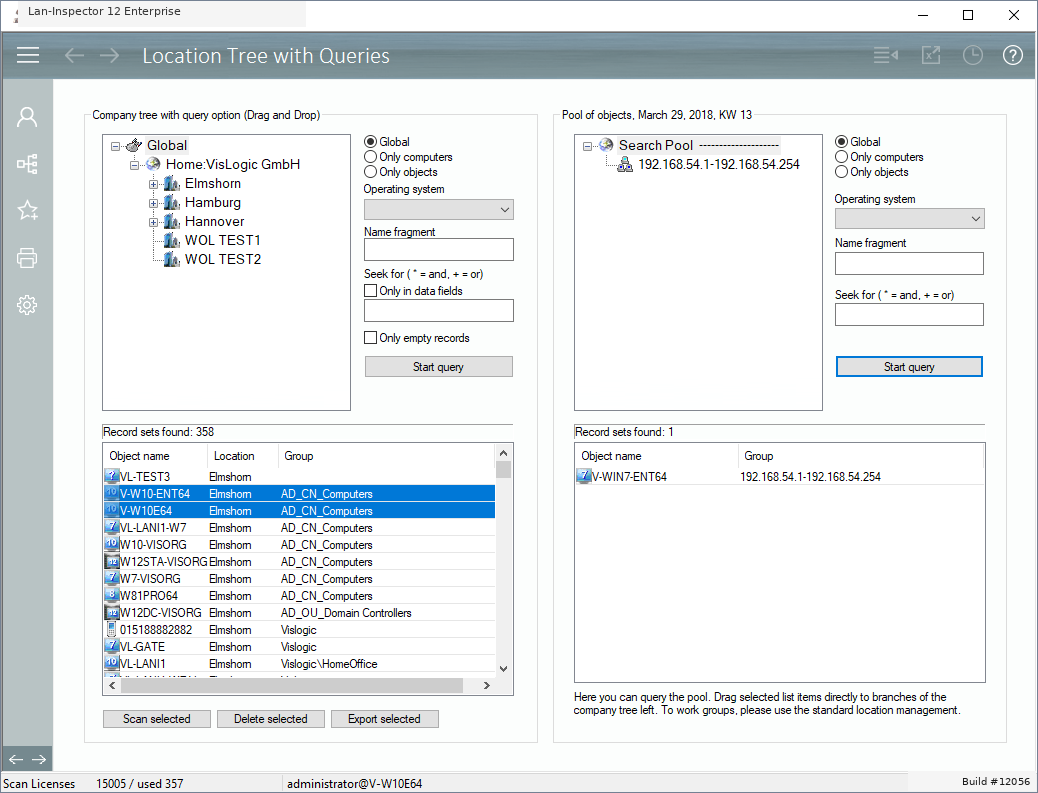
The full-text query supports “*” as an AND operator and “+” as an OR operator. In other views, logical AND and OR operations are represented by “/and/” and “/or/”. These operators can be combined to build more precise searches.
“Only in data fields” allows searching the data fields of the computer data set. If you have queried a list of computers, the functions scan, delete, and csv-export of the list will be available. You can also double-click a computer to switch to object detail view.